Reports
As described in Products/Reports, the Riverscapes Reports Platform is a flexible and scalable system for summarizing riverscapes data into professional reports.
The following information is intended for people who want to develop new report types. Think of the report type as a template that a user can use to generate a report specific to a chosen area with some user-chosen parameters, such as units of measure. It describes the information that must be provided for the development team to be able to build it out into a new report type. It also defines the limitations of the system - what data are currently available to reports. In other words, what's easy to include in a new report as opposed to contents that might require more effort to include.
Defining a new report consists of providing two things:
- Report content - this is a sample layout of a report, including all the boilerplate text and sketches of the tables and graphics.
- Report properties - metadata describing the report that are used to include it in the reporting platform user interface.
First, consider the 'who' and the 'why'
Before getting into details, be sure you have clearly defined why you need the report, and the people involved.
- Who is requesting the report?
- Who is going to approve the report design and implementation?
- Who is going to use the report?
- How are they going to use it?
- What are their specific objectives?
It may be preferable to build multiple specialized reports, rather than try to make one that has something for everyone.
Step 1 - Report Content
You need to provide a sample report. This can be any format including Word, Google Doc or PDF format, but in essence we need a complete layout of the new report from beginning to end. This should include the actual boilerplate text that will appear in every report (e.g. introduction, explanations, appendices) as well as examples of charts and tables. The charts can be hand drawn sketches, photographed and dropped into the document. If charts are described in words they must be specified in great detail, including which data are represented on each axes, the labels, units etc, as well as what to show when there are no data.
It's a good idea to annotate the sample report and explain your intent to the developers. This will help them make layout and contents decisions that invariably crop up when writing the code that will generate the report.
Do not rush this step! This process requires thinking hard and making important decisions. More time spent in the up-front planning stage will reduce the number of development cycles needed to get it right.
Report Data
The Riverscapes reports platform uses data produced by the 2025 run of the riverscapes network models. More specifically, it uses our custom database of RME metrics for approximately 54,000,000 DGOs across the conterminous USA.
For report authors, this means that you have access to approximately 150 RME metrics for any riverscape, riverscape sub-area or collection of riverscapes! Reports can include individual or aggregate calculations for any of these metrics, combining them into derived values as needed.
We can also use metrics that are calculated and reported for HUC10 watersheds (or higher aggregations). For example, the hypsometry chart is based on this watershed-level elevation data.
Charts and Tables
The riverscapes reports use the free and open source Plotly Graphing Library for charting. Report authors can specify any chart types that Plotly supports.
The reports load riverscapes data into GeoPandas data frames and can reduce these into summary tables.
Images
Provide image files for any logos, pictures or illustrations that are needed in the report or appendices.
Units
Report authors can choose how they want units to be handled within a report. They have the option of letting the user choose between US Customary (imperial) or metric units. Alternatively, they can choose to skip this choice and simply force units to be handled within the report generation itself.
Maps
All reports can choose to include an overview map that has layers for the report's area of interest (AOI), together with DGO polygons (depending on scale; for very large areas it is not realistic to display each DGO).
At this time, no other maps are possible within the standard reporting technology. The reports do not have access to GIS or to a library of GIS layers. They literally only have access to the AOI polygon and DGO polygons.
Custom Components
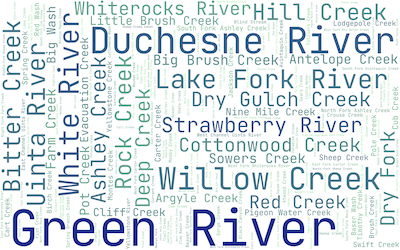
Reports can potentially include custom components available via PyPi Python packages. The best example is the riverscapes report word cloud that uses a custom package to produce the visualization.
Step 2 - Report Properties
The following items are needed to define a new report. Included are some considerations and things to avoid when deciding on the relevant item.
Report Type Title
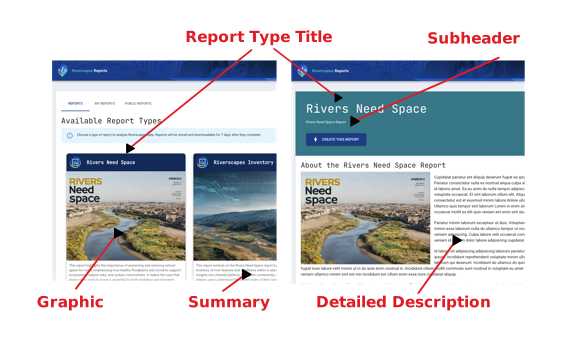
We need a name for your new type of report. Existing examples are "Rivers Need Space" and "Riverscapes Inventory". Obviously this title should clearly communicate the meaning of the report. It should be as short as possible (because report consumers will append other information when they generate the reports, such as the location). It should also be unique among the other report types that are available.
Short Title
This is an alternative, shorter form of the report type title. This can use abbreviations, and is used within the user interface where space is limited.
Subheader
One sentence summarizing the report goal. This is used on the report details screen underneath the title.
Version
A semantic version number (major.minor.revision) that is associated with each report that is generated. The version number appears inside the report and is useful for consumers to distinguish between older editions of report templates.
Example: 1.0.2
GeoFence
You can limit where users are able to generate a specific type of report. Typically we allow reports within the conterminous United States (CONUS), but this can be adjusted for each type of report.
[minLongitude, minLatitude, maxLongitude, maxLatitude]
[-128, 23, -58, 50], // CONUS bounds
Minimum and Maximum Area
You can specify the lower and upper permissible area that each report type can use. This is used to validate the polygons that the consumer picks, draws or uploads in the user interface. Consumers will be prevented from creating reports outside of the specified range. These limits can be useful for extremely detailed reports that are only intended for smaller areas.
Area limits are specified in square kilometers.
maxAreaKm2: 1_000_000,
minAreaKm2: 0.25,
Initial Map Location
The report author can specify the initial location and zoom level of the map on which the user specifies their area of interest. This is useful if a map is relevant to a very specific location. The map centroid is defined as decimal latitude and longitude, while the zoom is specified as a web map zoom level between 1 and 20 (1 being the globe and 20 being zoomed in). This parameter is optional.
[-110, 40, 4], // [lng, lat, zoom]
Area Definition Methods
You can specify the methods by which report consumers are permitted to define the area of interest for the report. You can pick one or more of the following:
- Pick List - provides a dropdown of polygon layers with predefined shapes for the report consumers to pick from (e.g. National Parks or watersheds).
- Upload - report consumers can upload a polygon layer from their computer in either GeoPackage or GeoJSON format.
- Draw - report consumers can hand digitize the polygon that represents the area of interest for their report.
- DGO Picker - report consumers can pick a riverscape level path to be area of interest for their report. They can control the downstream and upstream level path extents. This excludes tributaries.
Picker Layers
If you choose the pick list option in the Area Definition Methods above, then you can pick which polygon layers are available in the dropdown list. You can choose one or more from the following list of currently available layers, or alternatively provide a new GIS polygon dataset to be added to the pick list.
- BLM District Offices
- BLM State Offices
- BLM National Grazing Allotments
- US States
- HUC 10
- HUC 8
- HUC 6
- HUC 4
To provide a new layer to this list requires that you prepare a single part polygon GIS dataset in WGS84 (EPSG:4326). The layer should have a unique identifier field as well as a text "name" field (for labeling polygons on the map).
The layer should be carefully curated. Simplify geometries to reduce unnecessary vertices and repair geometries to remove problems such as self-intersecting geometries, null geometries etc. We can advise on this process, but will reject layers that exhibit these problems.
Graphic
We need a high resolution graphic that provides a visual representation of the report. This might be a screenshot of the report contents or an illustration that connotes its meaning.
The image file should be in JPEG format and 600 pixels wide by 400 pixels tall. See the report platform for existing examples.
Summary
A few (1-4) sentences providing an overview of what the report contains. This information is used on the home page of the report platform, directly under the report graphic, and helps consumers to quick understand why they would use the report.
Detailed Description
A long form description of the report contents, its motivation, contents and limitations. As well as richly formatted text, this can also include images (either linked or provided with the content).
How Reports Work
You can think of reports as a spatial selection of DGOs using the consumer's polygon (picked, uploaded or drawn) as the selection lasso. The DGOs with all their RME metrics are then passed into a block of Python code that then reduces the raw data into a series of charts and tables. In other words, after you provide your sample report, a developer will code this in Python to produce the desired report elements.
Submitting a New Report
Gather all the information described above and email it to support@riverscapes.freshdesk.com with the title "New Report" as the subject line.
The turnaround time for the new report depends on the complexity of the report contents, as well as how much overlap it has with existing reports. Someone from the development team will respond to submissions to discuss the level of effort and cost involved.