PBR Explorer
PBR Explorer is the Riverscapes Consortium's platform for documenting, sharing, and celebrating process-based restoration (PBR) work worldwide. Thousands of restoration projects are happening across North America and beyond — riparian plantings, beaver translocations, low-tech structures, and more — but much of that work goes unrecorded and uncelebrated. PBR Explorer changes that.
Practitioners submit their projects, credit the organizations involved, and publish a permanent record of what was done, where, and at what scale. The result is a growing, searchable global catalog of PBR accomplishments — a community showcase that makes the scale and momentum of restoration visible to everyone.
Open PBR Explorer
Browse restoration projects worldwide, discover organizations, and add your own work to the global record.
What PBR Explorer Offers
A Global Project Map
The Projects view is an interactive map of restoration projects worldwide. Zoom in on any region to see where work is happening, cluster by area, or click into individual projects for full details including photos, treatment lengths, milestone timelines, partner organizations, and restoration narratives.
Organization Profiles
The Organizations tab showcases every organization driving PBR work. Each profile displays their mission, a list of their projects, and aggregated as-built statistics — total project count, structure count, and cumulative treatment length. This gives organizations a permanent portfolio of their restoration accomplishments to share with funders, regulators, and clients.
Organizations in PBR Explorer are linked to Riverscapes Data Exchange organizations, providing a consistent identity across the Riverscapes platform.
Regional Statistics
The Regions view gives a geographic overview of completed projects, sorted by continent, country, and state/province. Click into any region to see its as-built statistics and browse the specific projects within it — useful for understanding the scope of PBR activity in a particular area.
As-Built Statistics
All public and private projects (excluding drafts) contribute to cumulative as-built statistics displayed on organization and region pages. This makes the aggregate scale of restoration work quantifiable and shareable — answering questions like how many structures has our organization built? or how much riparian length has been treated in Idaho?
Why Add Your Project?
- Visibility — showcase your work to the Riverscapes community, funders, regulators, and stakeholders
- Credit — formally acknowledge every organization involved and the role they played
- Record — create a permanent, searchable record of what was done, when, and at what scale
- Statistics — your project's treatment length and structures contribute to organizational and regional totals
- Connection — link related phases of a multi-treatment project to tell the full story of restoration progression
Getting Started: Adding Your Project
You will need a free Riverscapes Consortium account to submit projects. The same account works across PBR Explorer, the Data Exchange, and Riverscapes Reports. Once signed in, click Add a Project in the menu bar.
The Menu Bar
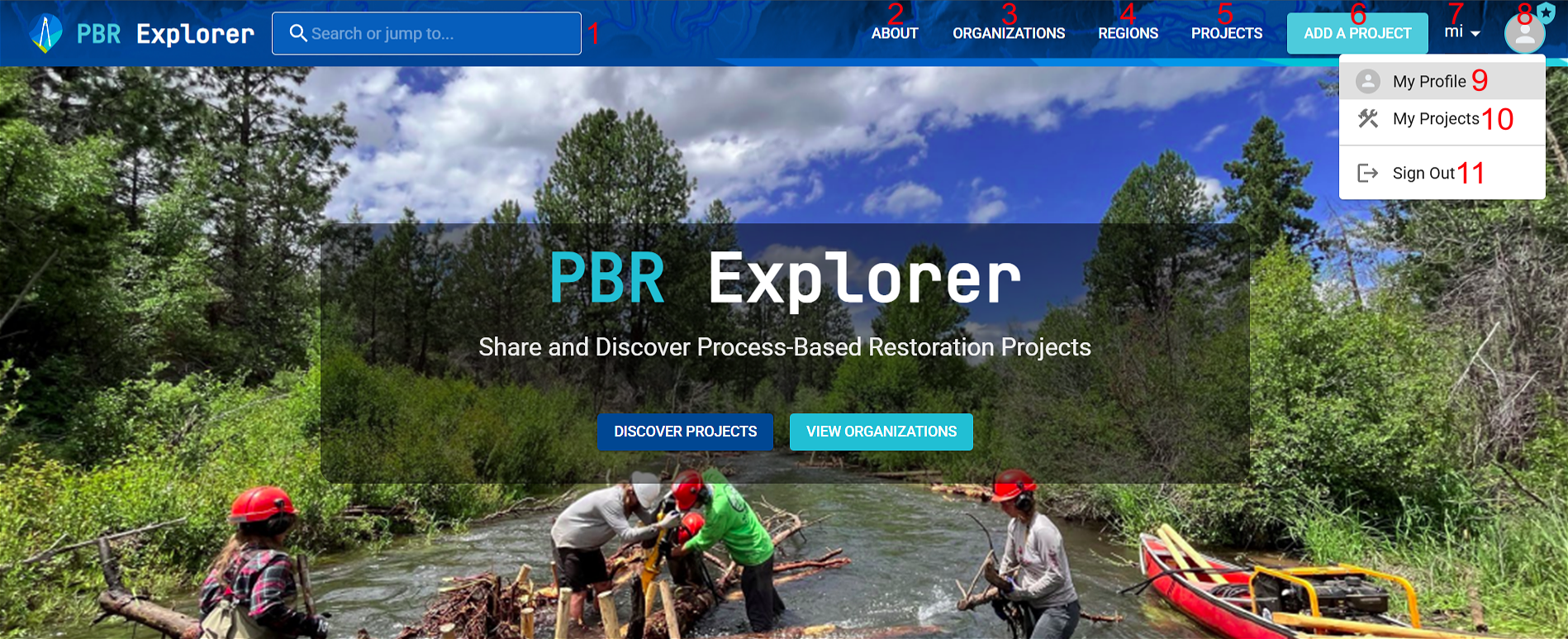
- Search Bar (1): Find restoration projects or organizations by name. Start typing (minimum three characters) to filter results.
- About (2): Learn more about process-based restoration, the Riverscapes Consortium, or to get assistance.
- Organizations (3): Discover organizations driving process-based restoration, with mission statements, project lists, and as-built statistics.
- Regions (4): Geographic overview of completed projects, sorted by continent, country, and state/province.
- Projects (5): Interactive map to explore restoration projects worldwide.
- Add a Project (6): Submit a new project — visible only when signed in.
- Unit Bar (7): Toggle display between imperial (miles) and metric (kilometers).
- User Profile (8): View organizations (9) and projects (10) linked to your account, and sign out (11).
Project Fields
-
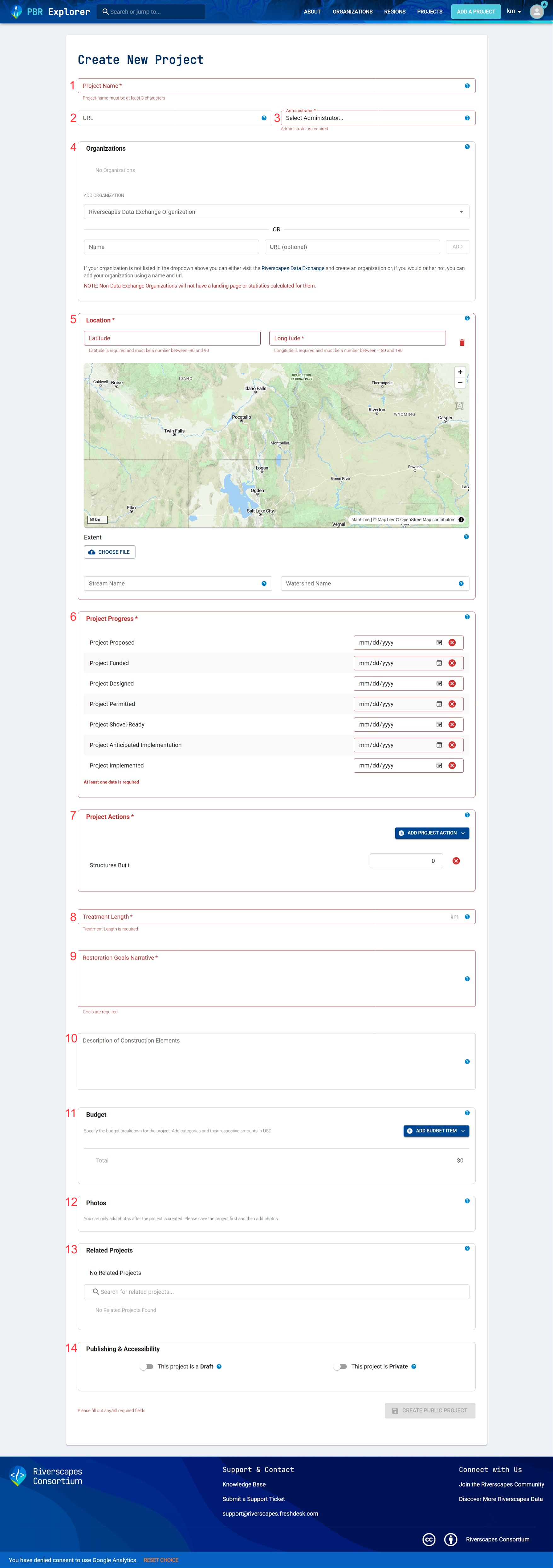
Project Name (1): A distinct project title of at least three characters. Required.
-
URL (2): Links to supplementary resources — design reports, as-built maps, websites, YouTube videos, and more. URLs must begin with
https://and include a domain suffix. Optional. -
Administrator (3): The organization or individual with permissions to edit the project. You can only enter your own profile or Data Exchange organizations you belong to. Required.
- Individual ownership: only that individual can make edits.
- Organization ownership: only members with administrative privileges for that organization can make edits.
-
Organizations (4): All organizations involved in the project, with roles. You can add organizations from the Data Exchange dropdown, or manually enter a name and URL if not listed. Multiple organizations and multiple roles per organization are supported — for example, one organization could be Project Manager, Field Implementation Crew, and Project Designer. Optional.
-
Location (5): The project's geographic location. Enter by typing latitude/longitude, clicking on the map, or uploading a GeoJSON polygon for the project extent. You can also add a stream name and watershed/HUC code for additional context. Required.
-
Project Progress (6): Timeline of important project milestones. Each milestone requires a complete date (month, day, and year). At least one milestone must be entered. Dates do not need to be in chronological order. Required.
-
Project Actions (7): The restoration activities that occurred. Multiple entries are allowed. At least one must be entered. Required.
-
Treatment Length (8): Total length of treatment in miles or kilometers. Must be greater than zero. Required.
-
Restoration Goals Narrative (9): A brief description of the goals and objectives of the project, ideally 1–2 paragraphs. Required.
-
Description of Construction Elements (10): Description of restoration activities — types of structures, materials, construction methods, etc. Ideally 1–2 paragraphs. Optional.
-
Budget (11): Breakdown of project costs by phase (pre-project, implementation, post-project). Optional.
-
Photos (12): Up to 20 project photos, each 100 MB or smaller. Photos can only be uploaded after the project is created. One photo can be designated as the cover photo. Optional.
-
Related Projects (13): Link up to 10 existing projects to highlight shared funding, treatment phases, or geographic proximity. Optional.
-
Publishing and Accessibility (14): Control project visibility. Optional.
| Draft Project | Private Project | |
|---|---|---|
| Use | Incomplete or pre-implementation projects | Projects on private property not for public disclosure |
| Visibility | Admin profile page only | Admin and affiliated organization profile pages |
| Included in as-built statistics | No | Yes |
Video Demonstration
BLM Webinar — August 2025
A webinar introducing PBR Explorer was presented to the Bureau of Land Management in August 2025. The slides and recording are available for anyone wanting a guided tour of the platform's capabilities.
View the BLM Webinar slides and recording →
Frequently Asked Questions
Why should I enter my project into PBR Explorer? To showcase it to the Riverscapes community, track as-built progression over time, and formally acknowledge every organization involved.
When should I create a new project? You can enter a project either upon completion or during pre-implementation if you want to track it early. If entered before implementation, designate it as a draft to exclude it from as-built statistics. The timing is up to you.
How should I enter a project with multiple treatment phases? Create a separate entry for each phase. This keeps each phase distinct from the initial as-built. Use the Related Projects feature to link the phases together and show the full progression.
My project is on private land and the landowner doesn't want the location disclosed. Can I still enter it? Yes. Use the Private setting under Publishing & Accessibility. The project will only be visible to the administrator and affiliated organizations, but will still count toward as-built statistics.
How do I get my organization listed under the Organizations tab? The organization must be created in the Riverscapes Data Exchange and be associated with at least one project (as owner or affiliate) to appear in the Organizations tab.
PBR Explorer in the Riverscapes Ecosystem

Riverscapes Data Exchange
Organizations in PBR Explorer are linked to Data Exchange organizations, providing a consistent identity and permission structure across the Riverscapes platform.
Riverscapes Studio (QRiS)
QGIS plugin for assessing riverscape health and planning LTPBR restoration — the design and monitoring companion to PBR Explorer's project catalog.