Archive Projects
Archiving moves projects into lower-cost storage. Essential project data is always retained, but some features are turned off to reduce cost. Archived projects can be restored to resume normal availability, but this recovery process can take up to 48 hrs to complete.
Project Data
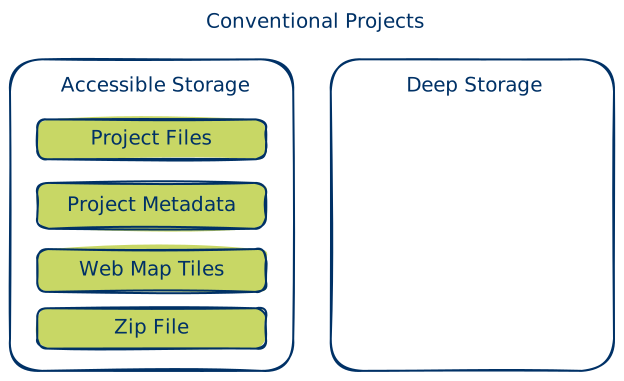
In Data Exchange, each project usually has four types of files:
- Main project files, like geospatial data, databases, and spreadsheets
- Project metadata, such as description, map boundary, and permissions (aka project.rs.xml)
- Web map tiles used to show the project on maps in Web Viewer
- A ZIP file used when someone downloads the project
For most projects, all these files are stored in high performance, accessible storage, with all Data Exchange functionality is supported.
Archived Projects
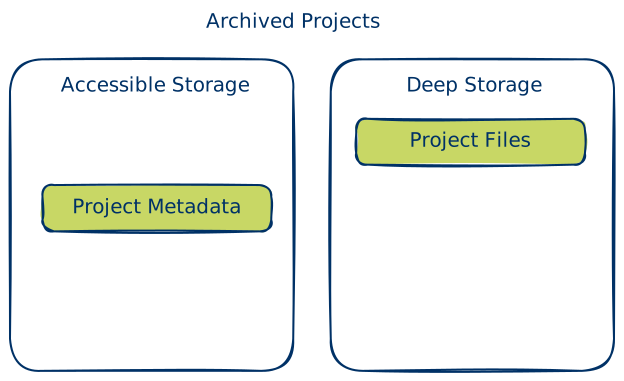
Two things happen when a project is archived: 1) The main project files are moved to deep storage. This reduces storage costs, and make these files temporarily inaccessible via the Data Exchange, and 2) Web map tiles and the downloadable ZIP file are removed. Project metadata always stays available, so the project can still be discovered in Data Exchange. But because the web mapping tiles and the ZIP are removed, archived projects cannot be viewed on web maps or downloaded.
In order to archive a project, you must have "contributor" status or higher to the organization that owns a project.
Restoring Projects
Unarchiving reverses the process. The main project files are moved back to accessible storage and the web map tiles are rebuilt. (The ZIP file is rebuilt only when someone requests a download.) The project becomes available again the Data Exchange with full functionality.